 Add to Chrome — it's free
Chat with any page
Ask about whatever you're reading — articles, dashboards, threads. Rexa reads the tab for context, no copy-paste.
How
Side panel ▸ askAsk about any page, search the live web, talk by voice, get instant replies, sharpen your writing, and let Rexa Pilot read your docs and finish tasks for you, on any site.


Loved by early users
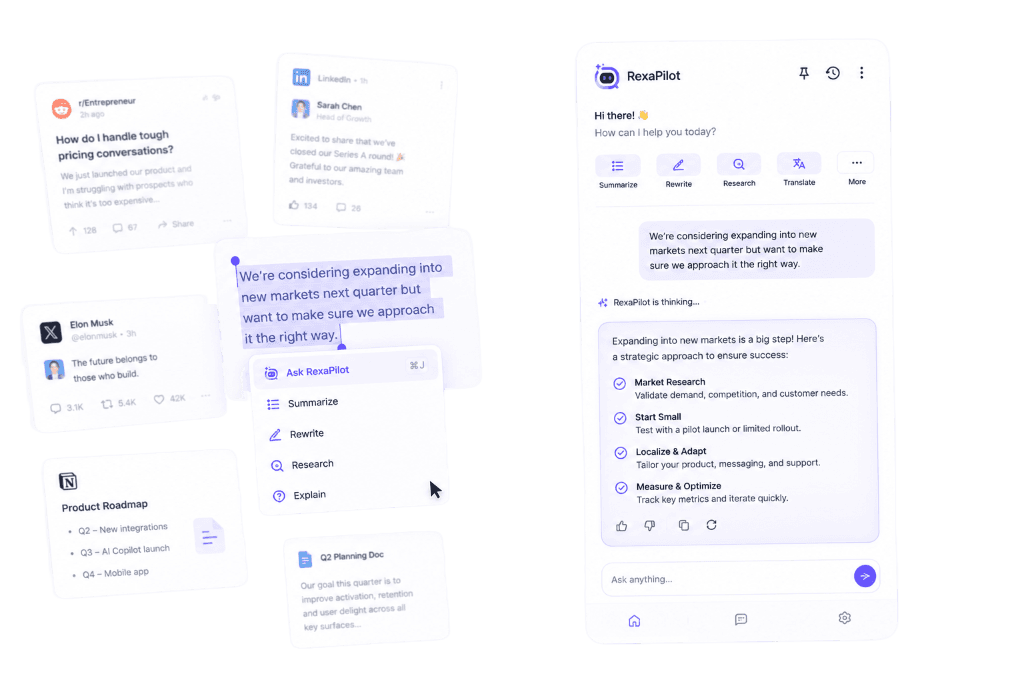
One sidebar — works on every site you already use
All-in-one Everything Rexa does
Most people use Rexa for one thing and miss the rest. Here's the full toolkit, grouped by job, with the exact trigger for every feature — including the ones hiding in right-click menus and floating bars.
Ask about whatever you're reading — articles, dashboards, threads. Rexa reads the tab for context, no copy-paste.
Side panel ▸ askUp-to-the-minute answers grounded in real sources, with clickable [n] citations.
Side panel ▸ Web toggleOpen any PDF and get the gist, then ask follow-up questions about it.
Open a PDF ▸ SummarizePull the transcript from YouTube, TikTok, Instagram, X or Facebook and summarize it.
On the video ▸ SummarizeDrag to capture any region of the screen and ask a vision model about it.
Side panel ▸ ScreenshotFull drafts and rewrites with tone, length and 3 variants — inside Gmail, Slack, LinkedIn, Outlook, X and Reddit.
✦ AI reply in the composerWrite platform-formatted posts and threads — X char limits, LinkedIn hooks, Reddit markdown — that don't read like ads.
✦ AI post by the post boxGrammar fixes, rewrites (improve, shorten, change tone) and ghost-text autocomplete in any text field you type in.
Just start typingHighlight text anywhere to explain, translate, summarize or rewrite it from a floating menu.
Highlight text ▸ menuPick your language once and every answer comes back in it — or translate any selection in place.
Highlight ▸ TranslateTalk to Rexa out loud and optionally share your screen for a real-time conversation.
Side panel ▸ CallSpeak instead of type — turn your voice into text anywhere you write.
Mic in the composerRecord Google Meet, Teams and Zoom with a live, speaker-labeled transcript — then get a summary and action items.
On the call ▸ RecordUpload PDFs, slides, sheets and docs, then ask across folders with answers grounded in your files.
Side panel ▸ LibraryClip any web page or selection straight into your Knowledge Base to chat with later.
Right-click ▸ Save to KBPull files into your Knowledge Base directly from Google Drive and Notion.
Library ▸ ImportSave brand voices and products once, then reuse them to keep every reply and post on-brand.
Side panel ▸ Brand kitHand it a goal and watch it navigate, click and fill forms in your real tab — confirming before anything important.
Side panel ▸ AgentA floating mini-toolbar on every page for one-tap summarize, ask and voice — no panel needed.
Floating bar on the pageMonitor keywords and surface Reddit and web threads worth engaging — ranked, with a suggested angle and alerts.
Side panel ▸ DiscoverNew to it all? Read the full guide →
No menus to memorize Where everything lives
Rexa meets you where you already work, so features aren't buried in a menu. Hover a spot to see what it unlocks.
Thanks for the note, I'll get back to you by Friday
02 Where the magic happens
A ✦ Reply button appears right inside Gmail, Slack, LinkedIn, Outlook, X and Reddit. Generate a full draft, paraphrase, change the tone, shorten or fix grammar — then send.
The agent perceives the live page, narrates each step, and navigates, types and fills forms in your real tab. It grounds personal answers in your profile and always confirms before anything important.
Start a live voice call, optionally share your screen, and have a natural conversation. Web search keeps answers current, with clickable [n] citations you can verify.
Listening…
The keynote starts at 9am PT and the lineup was just updated1.
03 Up and running in a minute
Install in one click and pin it. Sign in with Google — no credit card, no setup.
Hit the side-panel button on any page. Rexa reads what you're looking at and is ready to help.
Type or talk. Get answers with sources, draft replies in place, or hand it a goal to finish for you.
04 Questions
Everything you might wonder before adding Rexa to your browser.
Rexa is an AI sidebar for Chrome. It docks to the side of any page and lets you chat with that page, your own documents and the live web — plus reply, summarize, translate, take voice calls and run agent tasks, all without leaving the tab you're in.
The sidebar and most tools work on every website. In-page features like instant replies are tuned for Gmail, Slack, LinkedIn, Outlook, X and Reddit, while video summaries support YouTube, TikTok, Instagram, X and Facebook.
No. You sign in with Google and start using Rexa for free — no credit card required.
Yes. The do-it-for-me agent perceives the live page and performs actions in your real, logged-in tab — navigating, typing and selecting. It narrates each step and asks you to confirm before anything important, like submitting or paying.
Upload files into your Knowledge Base and Rexa builds a private, searchable index. When you ask a question it retrieves the most relevant passages and answers with inline citations back to the source file and page.
More than 50. Choose your language once in settings and every response — chat, replies, summaries — comes back in it.
Add Rexa to Chrome and turn the browser you already live in into your most capable assistant.